The Women’s Parliamentary Football Team trains on Wednesday mornings from 0800 to 0900 and they have 5-a-side matches on Mondays for 30 mins in a league.
The football team is a great group to have fun, make friends and get some exercise before / after work! We’ve had amazing events too, such as hosting the Women’s Afghan Refugee Football Team, training at Tottenham Hotspurs stadium and a match against Camden FC.
If you’re interested in joining, please email Hannah.short@parliament.uk with your phone number & the name of who you work for.
The following information was prepared by the Commons Library – to whom thanks.
There are no rules requiring the resignation of an MP who leaves one political party for another. A convention that the Member changing parties does not resign to fight a by-election accords with the arguments of Edmund Burke in the late 18th century. This MP, himself a rebel in a number of policy areas, considered that a Member was a representative rather than a delegate. Historically, the Commons has acted on the principle that all Members of the House of Commons are individually elected, and voters put a “cross against the name of a candidate”. While decisions on candidates may be affected by their party labels, MPs are free to develop their own arguments once elected, until it is time to face the voters in the next general election.
Are there any sanctions or other forms of discouragement which could be imposed on an MP for leaving the party on whose behalf she/he was elected?
There are no formal sanctions but discouragement comes in many forms, including: reaction of former party colleagues and the electorate. Although Members who change party allegiance during the course of a Parliament, rarely stand for their new party in the same constituency at the following election, crossing the floor does not mean political death. There are examples of Members being found safe seats by their new party and even taking their place on the front bench.
Is there any pressure to take action against Members who defect?
Occasionally there are calls for Members to resign or for by-elections to be triggered if they change parties. For example, in 2010, it was suggested that “Members should be required to cause a by-election if they defect to a different party from the one on whose manifesto they were elected”. However, the Government said that such a change would be “a major constitutional reform of the role of Members of Parliament and their independence” and that it had “no plans to do that”.
Who has crossed the floor?
True instances of crossing the floor – leaving the Government for the Opposition or vice versa – are rare. In the last 15 years, just three MPs have moved from the Official Opposition to the governing Party, none have gone in the opposite direction.
Quentin Davies crossed the floor from the opposition Conservative Party to the governing Labour Party in June 2007. He was given a peerage in 2010.
Robert Jackson, left the Conservative Party for the Labour Party, in January 2005. He left Parliament at the next election, in May 2005.
Shaun Woodward, who was elected as a Conservative Member in Witney in 1997, crossed the floor in December 1999. At the general election in 2001, he was elected as a Labour Member in St Helens South. He went on to serve as Northern Ireland Secretary from 2007-10 in the Labour Cabinet.
Previous examples include Winston Churchill and Reg Prentice who both held ministerial office in two different parties. Churchill left the Conservative Party in May 1904, joining the Liberal Party and becoming a minister in 1905. He was a defeated Liberal candidate in the 1922 and 1923 general elections, and as an independent in a 1924 by-election. In the 1924 general election he was elected as a Constitutionalist and became Chancellor of the Exchequer in the Conservative Government following that election. Reg Prentice was Labour’s Secretary of State for Education in 1974-75 but following deselection by his constituency party, he left for the Conservative Party in 1977. From 1979-81, he was a Minister of State of in Margaret Thatcher’s first Conservative Government.
The Library has produced a Note – Members’ Changes of Allegiance. It details moves by Members from one party directly to another and instances of Members losing or resigning a party whip.
ParliNet users will have noticed that there is no longer an A-Z index on the site, and so w4mp is going to list some of the more common pages here. Some of the links take you to the public Parliament website as these pages are no longer on the intranet.
Please note that some of these may be subject to change as pages are moved around ParliNet. We will do our best to keep up with them, but please do let us know if you spot any broken links by emailing us at editor@w4mp.org
Members of Parliament serve constituents who speak many different languages and whilst some people may bring a friend with them, or you may have some local community groups who may be able to help, sometimes it is necessary to engage the services of an interpreter or a translation service.
The House of Commons does not provide interpretation and translation services, but the cost of engaging such services can be covered by IPSA under ‘translation services. ‘
The services below are ones which have been suggested by MPs’ staff. You could also search for translators and interpreters local to you on yell.com
The Disability Access Fund can be used to support MPs to meet their legal obligations to provide accessible services, this can include British Sign Language interpreters for events and surgeries. It’s important to consider value for money and reasonability when using taxpayers funding, but for more support please email IPSA on adjustments@theipsa.org.uk
National Register of Communication Professionals working with Deaf and Deafblind People https://www.nrcpd.org.uk/
LanguageLine offers live interpreting services in over 240 spoken languages, face-to-face, online, via telephone or via a mobile app. They also provide interpreters for British Sign Language (BSL), either face-to-face or online via video.
LanguageLine also offers translation services such as document translation and website translation in over 190 languages.
Clear Voice https://clearvoice.org.uk Clear Voice is a social enterprise which returns 100% of its profits to Migrant Help to help to support refugees, asylum seekers, survivors of modern slavery and victims of human trafficking. Their interpreters have a lot of experience when working with migrants and refugees. They also deliver an innovative education programme called the InPower Project which fully funds unemployed refugees through the education they need to become professional interpreters.
Interpreting line offers face-to-face, video and telephone translation services for over 250 spoken languages and also British Sign Language (BSL.) They also offer document translation services.
MarsTranslation is a professional language services provider offering high-quality translation and interpretation services, supporting businesses, organisations, and public-sector communication needs across multiple languages.
Internet/Mobile Apps
Important!
Internet/mobile apps can be useful for quick translations where you need the gist of something quickly, rather than a definitive translation. Online and AI tools do not understand nuance, satire, irony or humour and so cannot match the skills of a human translator, and will not be as accurate. Whenever you need to translate something to be used in a professional or legal context, or something sensitive, you should consider employing the services of a professional interpreter or translator.
There may also be privacy issues using translation apps, as some may require access to personal data. They are not designed to be used for long or complex documents.
Apple Translate
If you have Apple device, you could use the Translate app and Siri, but it has only a small number of languages it can translate – Arabic, Chinese, Dutch, English, German, Indonesian, Italian, Japanese, Korean, Polish, Portuguese, Russian, Spanish, Thai, Turkish, Ukrainian, Vietnamese.
Activate Siri, and say the word of phrase you wish to translate and the language you want it to be translated into. It will respond with written text and also say the phrase out loud.
Google Translate
Google Translate is s an online text translator: https://translate.google.co.uk/ and there is also a mobile app. It has more than 200 languages available. Select the languages you wish to translate and then either type in the text, or press the microphone button and speak the words or phrases you wish to translate. Google Translate has a photo mode, where you use the phone’s camera to hover over written text and it will provide a translation in one of 37 languages (number correct at at 27 August 2024). It also has a ‘conversation mode’ for some languages.
Dissolution is the official term for the end of a Parliament before a general election. When Parliament is dissolved every seat in the House of Commons becomes vacant. MPs immediately revert to being members of the general public and those who wish to become MPs again must stand for election as candidates.
Within Parliament a dedicated General Election Planning Group is leading work to ensure Parliament is fully prepared for a general election to take place by January 2025.
The House has now published its revised dissolution guidance, which aims to help Members and Members’ staff understand the rules in place and the support available to them before, during and after the next election, including what to expect during the dissolution period.
There are separate areas for Members who are standing again and those who are not standing and a separate guide for Members’ staff which also includes information relating to boundary changes.
The full guidance is available as a PDF on Sharepoint
The checklists on ParliNet include useful material on each MP’s duties as an employer and how to prepare casework, with particular concern for data protection issues. Many things are time-critical, as staff passes are suspended five days after dissolution.
Please note that the guides etc may be updated before the election and so you should refer to ParliNet and not any stored web pages or PDFs for the latest guidance.
Dissolution is the official term for the end of a Parliament before a general election. When Parliament is dissolved every seat in the House of Commons becomes vacant. MPs immediately revert to being members of the general public and those who wish to become MPs again must stand for election as candidates.
The House has now published its revised dissolution guidance, which aims to help Members and Members’ staff understand the rules in place and the support available to them before, during and after the next election, including what to expect during the dissolution period.
Please note that the guides etc may be updated before the election and so you should refer to ParliNet and not any stored web pages or PDFs for the latest guidance.
The Local Government and Social Care Ombudsman is a free, independent service which can investigate individual complaints about councils, all adult social care providers (including care homes and home care agencies) and some other public service organisations. If they decide to investigate, they look at whether organisations have made decisions the right way.
Before making a complaint to the LGSCO, the constituent must first complain to the organisation involved to give them a chance to resolve the issue. They must go through all of the stages of that organisation’s complaints process, and the LGSCO’s website lists some tips for making a complaint. If, after the organisation’s complaint process has been completed, and the constituent is still not satisfied, then they can complain to the LGSCO – but only if it is a matter which they are able to investigate. The LGSCO will not investigate unless the organisation’s complaint process has been completed.
The types of issue the LGSCO can investigate include
Adult social care
Children’s Services
Education
Housing
Benefits and tax
Planning and building control
Environment, regulation and waste services
Transport and highways
Leisure and culture
Corporate services, elected members and personnel
You should check on the LGSCO website to make sure that the matter you wish to raise is one that they cover.
The best way to make a complaint to the LGSCO is for the constituent to fill in the complaint form on their website: https://www.lgo.org.uk/how-to-complain It is better that the constituent does this themselves, if possible – it’s quite simple and does not need to be an essay, just a paragraph will do. It is preferable to use the online system, so that it keeps the telephone line free for those who are not able to go online.
Those who are not able to use the online system may telephone 0300 061 0614 to speak to an adviser.
The telephone line is open:
Mondays 10am till 1pm Tuesdays 10am till 1pm Wednesdays 1pm till 4pm Thursdays 10am till 1pm Fridays 10am till 1pm
Migrant Help exists to protect people affected by displacement and exploitation, helping them thrive as individuals and recover from their trauma. They support those most in need and least likely to find support elsewhere, whilst aiming to bridge community gaps and bring services and support together.
You can read more about Migrant Help here: https://www.migranthelpuk.org/
Whilst there is no MP hotline for Migrant Help, they have provided some information on how to help your constituents:
In Your computer is more than a typewriter, I wrote about how you can improve the appearance and legibility of documents by fine tuning spacing between lines of type, between paragraphs, and around headings. Perhaps I made it sound like hard work. Now I’ll explain how to make life easier with the use of Styles.
If you look at professionally designed publications, you will notice a regular and repeated pattern to the design of text, headings, captions, etc. So it was in 1984 when my wife Noi and I became the design and production team for a small serious magazine, Inside Asia. The editors wanted to follow the pattern of other serious news and analysis magazines, particularly Time, and Far Eastern Economic Review. I promised our typesetters that we would communicate our requirements as clearly as possible.
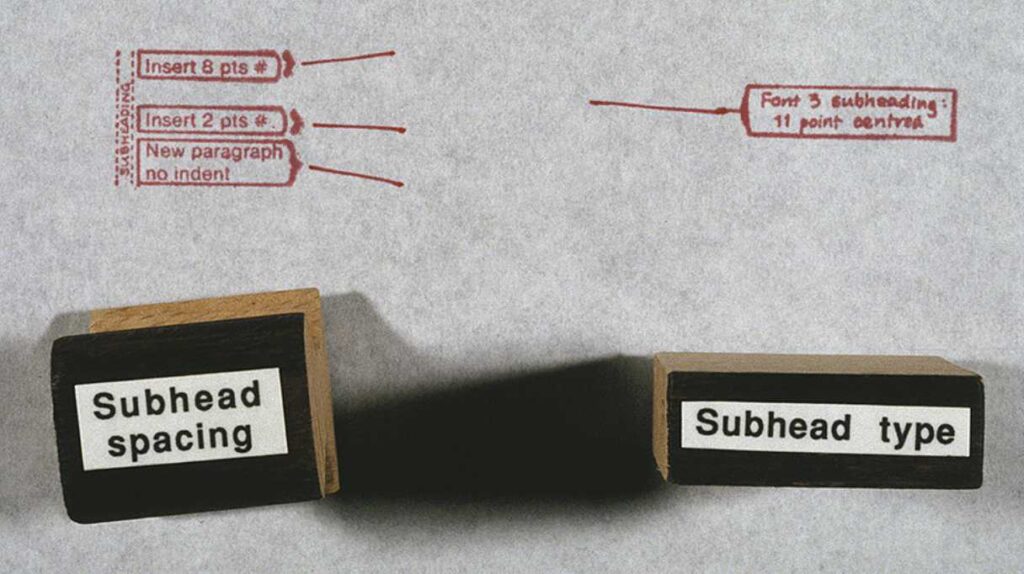
In those days that involved working with typescripts, prepared with a large left margin; taking a fine red pen; and writing typographic instruction and British Standard marks (BS 5261 – 1976) to comprehensively ‘mark up’ the copy. Our repertoire included standard text paragraphs in Times New Roman, justified, with an indented first line; block quotes indented left and right with space above and below; subheadings in Helvetica Bold; headlines in Franklin Gothic bold; an enlarged ‘standfirst’ paragraph; and photo captions.
Marking up copy for a 48-page magazine could get pretty boring. Then we had a bright idea. On our next trip to Bangkok, we took artwork for a set of 20 rubber stanps, and got two sets made. The face of each stamp had comprehensive typesetting instructions, and to the wooden handles we added a more generic name such as ‘Subhead’. Even our editors could understand those! And so we accelerated the mark-up of copy.
Setting up and using paragraph styles today
In word processors like Microsoft Word or OpenOffice, and in more capable publishing software such as Adobe InDesign, FrameMaker or Affinity Publisher, you can set up your own ‘box of rubber stamps’. Most programs come with a ready-to-use set, but you can add to them and redefine them.
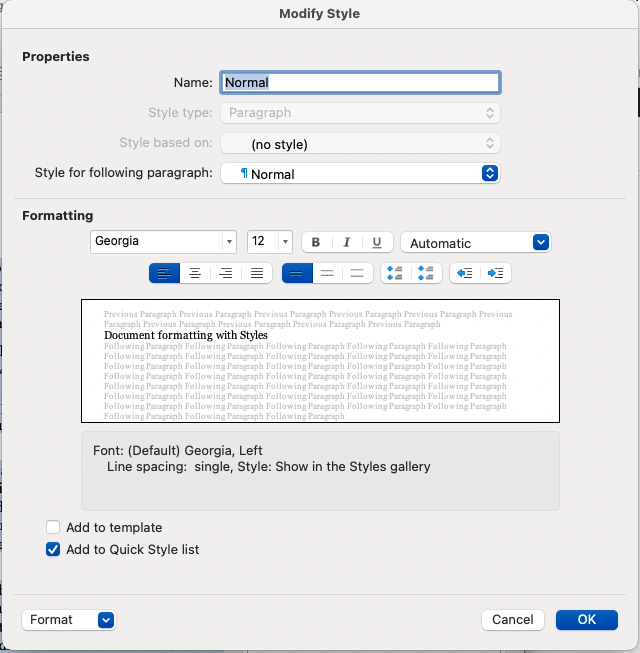
In the software I’m using to draft this, my redefinition of the style ‘Text body’ specifies the font Georgia, at 11pt size, and colour black; custom linespacing of 3 mm; no indents left or right, or to the first line; with an extra 3 mm space after each paragraph. To apply the style, I place my text cursor anywhere in a paragraph, or select a range of paragraphs; and click ‘Text body’ from a styles menu – and that’s it! Now, all those paragraphs have consistent formatting, done in the twinkling of an eye.
It can be time-consuming to set up a customised set of styles, and you wouldn’t bother if ywriting just a letter or a quick memo; but if you are asked to prepare a thirty-page report with three levels of heading, block quotes from other documents, and several ranges of bullet points, you will give yourself a big Thank You for doing so.
Here’s a bonus tip: once you have made that document, you can save it as a Template. Even if you delete all of the contents, the Styles will still ‘haunt’ the template ready for the next report you have to make.
Several times I have been called in by organisations to prepare sets of template documents. I’ve done it in Word, PageMaker, and notably in FrameMaker, a serious software package for creating documentation, books and software manuals.
For example, Incomes Data Services was publishing six regular journals. They wanted to refresh the designs, and give them a more co-ordinated appearance. Their production team knew how to use Paragraph Styles, but they were wary of setting them up. First I analysed the journals and the kinds of content in them, then I took sample copy from old editions, and went through numerous iterations of designing, printing and co-evaluating until everyone was happy.
More elaborate paragraph styles
The definition of a paragraph style can include whether a paragraph is a bullet item, and if so, what symbol to use for the bullet, what colour it should be and with what amount of indenting. Or a heading might be numbered. For my friend’s PhD thesis we had a FrameMaker template with headings numbered to four levels deep (e.g. 3.14.6.2). When her supervisor suggested she move one chapter, the whole lot re-numbered themselves ‘automagically’!
Other useful definitions you can make could include forbidding a multi-line bullet point from breaking over a page boundary, or forcing a heading to stay on the same page as the next three lines of text. In narrow columns where the text is justified left and right, you will probably want to permit hyphenation, and in more sophisticated software you can set rules for how extra space will be distributed between words and characters, and the minimum number of characters before or after the hyphen.
Paragraph styles can be based on previously defined paragraph styles. The Incomes Data Services journals were a case in point. First I set up the style ‘Body para’, with each first line being indented 4 mm. Then I made a derived style called ‘First para’ — exactly the same except with no first-like indent. I then set up ‘Bullet point’ based on ‘First para’, but with the appropriate bullet symbol, a tab, and an indent from the left margin…
Character styles
A character style is usually created as an override to the normal setting for text. I first encountered this when using a specilist document editing programme called FrameMaker to prepare training materials, where I would want a special emphasis on a technical word being defined for the first time. I wanted it formatted as a sans-serif font, bold, and with the size minutely adjusted. I set that up on a menu of character styles and used it as needed. Otherwise, I know I would have gone mad!
Everyone working for an MP, in whatever capacity, will find themselves creating documents for a variety of purposes. In this guide Conrad Taylor, who has been doing this for many years, will look at ways to make the documents you create on computers more attractive, more professional looking and more legible.
As a starting point may I introduce you to Robin Williams – a Californian graphic designer, writer and teacher, whose career has run spookily parallel to my own. We’re even the same age.
In my case, I learned graphic design working on magazines and newsletters, but was drawn to the production of reports, documentation and learning materials. In the early 1980s, I handed copy to professional typesetters, specifying and proofreading phototypeset matter. Then, in 1985, I discovered what was heralded as ‘Desktop Publishing’. Companies were sold the promise that if they bought a DTP system, their staff could produce professional documents in house. What was not mentioned, was that there was more to that than buying a Mac or PC and installing PageMaker. It also required a software upgrade to the ‘meat computer’ running between your ears.
For nearly 20 years, I trained people how to become better document and magazine designers using computers. In parallel, Robin Williams was doing the same. In the early 1990s she wrote a book provocatively titled, ‘The Mac Is Not A Typewriter’. She soon followed that with another, ‘The PC Is Not A Typewriter’. Both are still available via online booksellers. What I’m about to tell you is similarly drawn from my own experience of design and publishing, applied to today’s technology.
More prosaically, I can improve the typography of my everyday documents by typing the ‘en dash’ (–) and the ‘em dash’ (—), and create a proper ellipsis character… (By the way, ‘en’ and ‘em’ are valid words from the world of typesetting – and you can use them in Scrabble!)
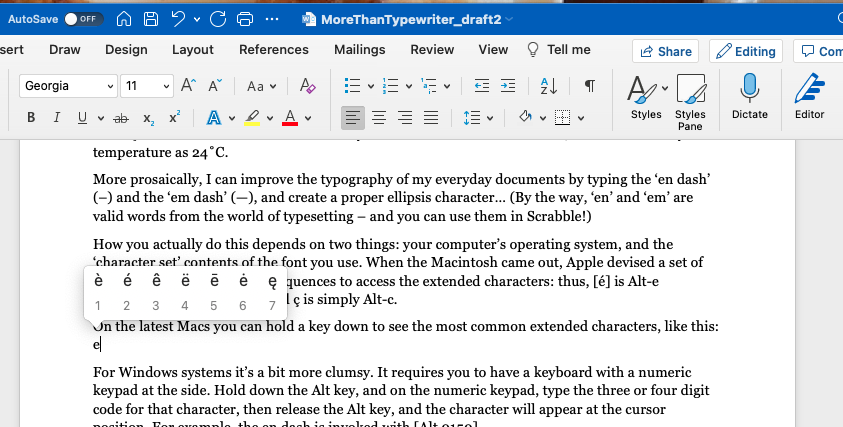
How you actually do this depends on two things: your computer’s operating system, and the ‘character set’ contents of the font you use. When the Macintosh came out, Apple devised a set of easy-to-remember keypress sequences to access the extended characters: thus, [é] is Alt-e immediately followed by e, and ç is simply Alt-c.
On the latest Macs you can hold a key down to see the most common extended characters
For Windows systems it’s a bit more clumsy. It requires you to have a keyboard with a numeric keypad at the side. Hold down the Alt key, and on the numeric keypad, type the three or four digit code for that character, then release the Alt key, and the character will appear at the cursor position. For example, the en dash is invoked with [Alt 0150].
There are several reference pages on the Web to help you with these Windows character codes, for example https://www/alt-codes.net.
Over time, font standards have changed, some fonts have thousands of available characters, and now there are characters you can’t access with a keyboard shortcut or an [Alt] numeric code. If you need that (e.g. to refer correctly to the Polish city of Łódź), learn how to access the Windows character map utility, or its equivalent for Mac or Linux. Or you might have it built in as a facility in your software. I am writing this in OpenOffice (it’s free!) and under the Insert menu I can invoke a table of the characters in the font I am using, with the menu item [Special Character…].
The importance of controlling space. And spacing
In typography, we can say that type matter consists of ‘Ink’ and ‘Space’. My focus here is the space between lines, and between paragraphs. The appearance and professionalism of your documents will be transformed!
Most office documents are printed to A4 paper, with rather narrow margins; OpenOffice defaults to margins of two centimetres each side. The column of type is therefore wider than you would find printed in a book or magazine. As your eye scans back from the end of one line to the beginning of the next, it is hampered by the need to identify which line to latch onto. Furthermore, as you read each line, the type above and below tends to intrude into your central field of high-resolution vision which is what you need to concentrate on.
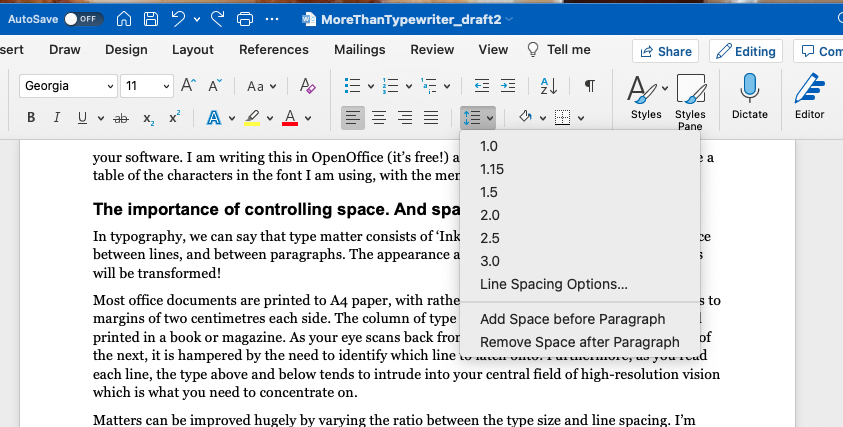
Matters can be improved hugely by varying the ratio between the type size and line spacing. I’m writing this draft using a TrueType font called ‘Georgia’, at size 11pt. If I use the normal ‘single linespace’ configuration the channel of space between the lines appears rather squeezed. To compensate, I deliberately use a ‘fixed linespace’ setting of 5mm. Immediately, legibility is improved and the tone of the page is lightened.
And what of the space between paragraphs? I never make inter-paragraph space by pressing the carriage return key twice. Instead, I’ve set up the Body Text style so each paragraph inserts an extra 2.5mm space after it. As for my subheadings, in Arial 13pt, they get 4mm extra space above, and 2mm space below, bringing them into a better logical relationship with the text that follows.
Isn’t this a lot of work to do? Not really, because I’ve set up formatting stored in a list of Paragraph Styles. With a single click, I can tell a paragraph – ‘you are a Text Body paragraph, so behave according to the formatting definitions I’ve set up for you!’ And it does what it’s told. In my following article I shall describe in detail how you can make use of this powerful feature of just about all modern word processors and publishing software.
There is a comprehensive set of tutorial on aspects of Microsoft Word on the Microsoft Support website at