Video Recording Meetings, Events and Lectures

Standard

This is a follow on to our previous guide exploring ways in which audio recording may help with parliamentary work, and explaining how to do it on a modest budget.

I don’t consider myself a video professional, but I’ve made a several budget educational videos, and recorded meetings and conferences. I participated in two working groups of the British Computer Society, looking at how BCS branches and groups might video meetings, primarily for the benefit of those who can’t attend events in person.

So, you might expect me to be an enthusiast for video technology. In fact, I often urge caution, because making good video takes more skill and time and planning than audio. Good video kit is expensive, and often difficult to transport. Storing digital video can consume huge amounts of memory, and costs bandwidth to transmit; with both image and sound to kick into shape, the editing process is more complicated; and video technology and technical standards have been changing very fast. It’s been hard to keep up.

If video from an event will be no more than a speaker’s ‘talking head’ and some Powerpoint slides, I tend to suggest concentrating on a good quality audio recording. It’s cheaper, easier, and in the edit it’s so easy to improve a presentation by snipping out the ‘Ums’ and ‘Ers’… and you can’t do that as seamlessly in a video edit.

However, it’s not my job to put you off! Visual content can be very informative. I’ve filmed at graphic design conferences, where slides and other images were an essential to understanding the subject, and audio-only would be quite mystifying.

Anecdotally, video is said to appeal better to a younger audience than audio alone. It used to be said that quality expectations of video production have been driven high by television and movies, something we’s be hard put to match; but in the era of YouTube and Facebook amateur video, maybe that is less true?

A technical revolution: video everywhere

Sensor chips for image capture came to consumer digital cameras and camcorders about 25 years ago. Since then, they have been attaining higher resolutions, better sensitivity to lower light levels, and have become cheap. What was once an exotic technology found only in space satellites is now in everybody’s smartphone! This revolution is boosted by ever more powerful video-signal processing chips, and the capacity and speed of solid-state memory, such as the near-ubiquitous SD memory card.

In preparation for this article, I compiled a list of devices that now ‘do video’. Within minutes, I had listed well over a dozen. There are smartphones and tablets; bodycams worn by police, cyclists and daredevil skateboarders; dashcams and baby monitors; cameras for home security or watching wildlife; cameras on drones. There are digital stills cameras, from amateur to professional grade, which now also function as video cameras; and at the high end, specialist video cameras with which you could even shoot a feature film.

Ask: why are you doing this?

As in my audio-recording article, let’s start by examining possible purposesfor making video. I divide these into three rough categories:

Evidencing’ – when the main point is to have a visual record. Dashcams, bodycams and security cameras are designed expressly for this purpose, but there are many examples of people pulling out a smartphone to bear witness – from a mate’s skateboarding prowess or a spat between cat and dog, to a terrorist or criminal attack. Look at how much smartphone footage makes it onto the TV news (and Facebook) these days!

Presencing’ – Here, I mean when you bring someone’s eyes to watch something beyond their immediate view (usually in real time, without making a permanent recording). An example is using webcams for a teleconference or Skype chat; another is streaming live video from a public meeting to reach a wider audience. Eliza, a friend in Ghana, runs a restaurant and music spot. Every Friday (reggae night) she puts an iPhone on a tripod stand, points it at the bandstand and part of the dance floor, and streams live video to Facebook. It’s making her establishment famous, at low cost. ‘I have next to no PR budget,’ she says. ‘Social media exposure is worth those 4G data fees!’

Presentation’ – By this I mean when you want the final product to look really The purpose of the video may be to explain, persuade, demonstrate or make a case in a convincing and professional manner. The filming should be well-lit, the camera handled smoothly, the audio capture crisp – and the format in which it is recorded should make it easy to edit afterwards, cutting together scenes and making use of graphics and text overlays. Maybe you can aspire to this quality of production yourself, with access to suitable equipment and software; or you may decide it’s more sensible to bring in professional outside help (paid or volunteer).

A few simple, low-cost solutions

Smartphone videography. I’ve already mentioned the smartphone as a video camera, and it has the unique advantage of Internet connectivity – as used in Eliza’s video-streaming escapades. But your smartphone can make better video with a couple of modest additions:

A smartphone tripod. Tripods for smartphones are not designed for dynamic panning shots – they are too flimsy – but they will hold a phone steady, and are easy to carry and set up. For example, the Paladinz Phone Tripod (£15) weighs just 360g and expands to a height of a metre. It even comes with a Bluetooth pause-record controller for the phone.

A compatible external microphone. For smartphones, the commonest type is the sort you clip on a subjects’s clothing, with a thin lead connected to the phone. Many cost less than £20. They are useful for interviews or ‘video selfies’, but they won’t help you get good audio at a meeting, or from a speaker on a platform. Try a directional mic: a well-reputed one for phones is the Røde VideoMic Me at about £60. Like a small torch in appearance, it is clamped to one side of the smartphone. (http://www.rode.com/microphones/videomicme)

Super webcam. Here I’m using ‘webcam’ to mean a camera attached to a PC or laptop, as used with Skype and video conferencing applications. Many laptops have a webcam built in, but an external, USB-connected webcam is easier to point where you choose, and usually works better in dimmer light. For under £100 you can get webcams that work at high resolutions such as 1080p or HD, and have stereo mics built in. An example is the Logitech C920 HD Pro, at £70.

I accidentally took a step in this direction when I bought an IPEVO V4K camera for £99. This works like an overhead projector: you point it down at a document to project the image onto a screen. It turns out that it also does ‘super webcam’ stuff, with an 8k imaging chip, and I’ve been testing it for medium-quality video streaming too.

To use a webcam and record the video for later editing, you’ll need software that captures video and audio from devices attached to your computer, and saves the combination to your hard disk. I did this recently, recording the whole of a two-day training workshop. I linked an old camcorder to my laptop with a FireWire cable, and my audio mixer desk via USB, and captured the mix with QuickTime Pro 7 software for Mac. The accumulated raw ‘product’ came to about 70 GB, but… I had plenty of space on the hard disk.

This IPEVO camera is based on high-definition webcam technology. Its primary function, when the computer is attached to a data projector, is to show documents and other objects live to an audience, but it can also take still images and record video to disk, through various software packages. Other ‘super-webcams’ are available from different makers, with Logitech a prominent brand.

The ‘fancy camera’ route. Here I mean serious digital stills cameras which also record digital video. Canon and Nikon have been leading rivals in this market, bringing video capabilities to their digital single-lens reflex cameras (DSLRs). A major advantage of these cameras is that you can change lenses to customise for different situations, such as extreme telephoto or wide-angle coverage. (When filming meetings, I prefer to do so from the back of the room, for which you need some telephoto capability.)

Sony Alpha on Tripod

The Sony Alpha 6000 is an example of a mirrorless DSLR, small enough to be carried in a jacket pocket, but delivering excellent still image quality from low light levels, for less than £500 with the short zoom lens shown here (other lenses available). In addition, it has fairly respectable functionality as a video camera, saving either AVCHD or MPEG-4 movies files at a variety of resolutions. It could certainly handle an interview, but a file-size limit of 2 GB means it can’t record continuously for more than about 20 minutes.
If you’re not happy with the quality of audio picked up by the tiny embedded microphones, the smart hot-shoe can mount a dedicated stereo microphone with two swivelling heads.
Note that in this picture, the camera is supported by a stout tripod with a ‘fluid-effect’ video head, for smooth panning to track a mobile subject.

DSLR videography seems particularly popular in the music video world, where clips and shots tend to be very short. A couple of years ago, a music promoter friend bought a second-hand EOS 5D Mark II: Canon’s first digital SLR camera to support full HD recording (1920 x 1080 pixels). He’s hoping to make his own music videos. Certainly the image quality is superb – one would hope so from a camera costing a few thousand pounds with lenses! After spending that tidy sum, he turned to me for help in buying a stable professional video tripod, extra batteries, battery chargers and memory cards.

Memory card capacity can be an issue with these cameras. If you shoot high-resolution, minimally compressed digital video (best for editing and professional production), you will see memory gobbled up at amazing speed: when filming with 4K resolution, 4 GB will be gone in just under 40 seconds! You should seriously ask yourself whether you can’t serve your purposes by filming at a lower resolution.

When standards for SD and Compact Flash memory cards were first devised, they adhered to a media formatting standard called FAT32, which doesn’t allow digital files bigger than 4 GB. Recording a full public lecture will need serious amounts of memory for storage. Some cameras will truncate your recording; in the better ones, the recording gets sliced into sequential 4GB chunks, and you have to glue them together again in editing. The very fanciest cameras now use advanced memory cards with formats such as CFast, which can store enormous files.

Mirrorless Micro Four Thirds. Other kinds of digital stills camera have dipped their toes into digital video-taking, such as the new ‘mirrorless Micro Four Thirds’ (MFT) machines. They are like DSLRs, but built around a smaller albeit high-resolution imaging chip, and they dispense with the pentaprism viewfinder and mirror of the classic SLR camera in favour of a purely electronic viewfinder. These design decisions have made them quite affordable.

Some years ago with regret and resignation I decided that video technology was changing so fast that I could no longer afford to keep up wityh the latest gear – plus, I’m getting a bit old for dragging tripods and video cameras around. But now I am thinking, a small MFT camera would let me carry a compact stills camera in my pocket, with reasonable-quality video recording capability too. The Sony Alpha 6000 camera is on my wish list (£500 with a standard zoom lens).

Professional video cameras. In the interests of completeness I should mention these, though I suspect none of my readers would spend £5,000 on a video camera body (without any lenses, mind you.) However, in a photo caption below I briefly describe one such camera from Blackmagic Design, so you can understand why these machines help the pros to do their job more reliably. And if you do hire a pro, they might bring one with them!

Professional video cameras are used in television studios, outside broadcast and these days even for making feature films. The URSA range of cameras from Blackmagic Design are representative of this class, with prices (for the body alone) between £3,000 and £6,000. This Blackmagic URSA Mini Pro 4.6k G2 is currently top of the range. Note the many surface-mounted controls and lens focus and zoom rings which give the operator instant access to the camera’s features.
With its large sensor array generating feature-film quality footage at up to 300 frames a second, 4608 x 2592 pixels, this camera generates huge amounts of data, and takes two CFast memory cards, and can even plug into a USB-C external hard disk for extended shooting. To handle difficult lighting conditions, a special 15-stop High Dynamic Range file format can be selected, rather like the RAW format on the better digital stills cameras, so the studio can afterwards grade, process and edit the footage to best effect in DaVinci Resolve Studio software.
Photo: Blackmagic promotional material.

Sound investments

I cannot over-emphasise how important good sound capture is to video production, especially in the political sphere where the spoken word is our currency. Even pricey DSLRs have ridiculously inadequate onboard microphones, but at least they have audio inputports. You can mount a broadcast quality directional mic to the flash-mounting shoe, such as the Røde VideoMic with its integral shockmount (mono), or the Sennheiser MKE 440 (stereo). There are also adapters such as those from Beachtek (discussed later) which let you tap into just about any sound source.

Then there is camera support. I’ve already mentioned video tripods, which come at a range of price points. If you are wanting to actively manage the ‘pan’ and ‘tilt’ of the camera, for example to swing the camera between speakers, you’ll want a robust and heavy tripod with a ‘fluid effect’ video head and a steering handle. These dampen camera movements, making them less jerky.

Tripods can tie you to one spot, but a ‘spider dolly’ is a device that sits under a tripod and gives it wheels so it can be moved across a smooth floor to a new location. ‘Steadicam’-style devices let you walk freely with the camera while smoothing its movements. One very useful yet under-rated accessory is the monopod, with some of the stability of a tripod, but far more portable and easy to reposition, and usable in a small space.

Many digital cameras and camcorders now have ‘optical stabilisation’. Movement sensors inside the lens detect any shaking, and the mechanism moves prisms around in the light-path to steady the shot. If your camera has got this feature, turn it on.

Lighting, and other environmental matters

Light within the filming environment can make a tremendous difference, including in ways you might not expect. Adequate and even lighting, without strong highlights or shadows, is easiest to cope with, especially for lower-cost video cameras and devices which cannot cope with ‘high dynamic range’ situations.

But we don’t always have much choice. Suppose you’re filming a speaker on a stage, picked out with a spotlight. Automatic exposure may sense the overall darkness of the scene, think the lighting is inadequate, increase the lens aperture or alter the ‘gain’ on the sensor, and as a result the exposure burns out the features of the speaker’s face. An experienced videographer with better equipment should be able to override this auto-exposure to compensate.

Low light levels also make focusing more difficult. Autofocus mechanisms rely on having enough light to do ‘feature detection’. Cameras which manage exposure by adjusting the width of the aperture gateway in the lens (e.g. DSLRs) can compensate for low light levels by opening the aperture wider: but this results in shallow ‘depth of field’ – that means, it reduces the extent to which things are in focus in front of and behindthe actual focus point, and the subject is more likely to fall out of focus. These auto-gremlins can be kept under control if your machine lets you switch focus control to manual.

When making close-up video indoors, a portable light mounted on or near the camera can help. White-light LED arrays are popular for this purpose these days, because they provide a decent amount of light without quickly draining their battery. (I have a cheapskate version of this – a couple of rechargeable LED car inspection lights from Lidl, of all places!)

On a sunny day outside, contrast between highlights and shadows e.g. across a person’s face can make satisfactory exposure difficult. Fill-in lighting to soften the shadows will help, and could be provided simply by someone holding up a white-painted sheet of hardboard as a reflector.

Sound. If ambient noise interferes with recording, solutions include getting a mic as close as possible to the speaker, like a news reporter on location; the mic could be linked by cable, or by radio. If you can’t get a mic to the speaker, a highly directional mic helps by rejecting off-axis noises.

Beachtek (https://beachtek.com/) makes audio adapters for camcorders and DSLRs. With these and similar, you can feed in audio from almost any microphone or sound mixer, and volume control knobs give the camera operator the power to adjust the audio level. When I filmed the Information Design Association conference some years ago, we had several microphones feeding into my mixer desk, operated by a student volunteer. The combined audio was fed from the desk through 30 metres of shielded XLR cabling, to my camcorder at the very back of the hall, with a Beachtek unit between it and the tripod.

Video editing and conversion for distribution

When I started making video in the early 1990s, editing was a cumbersome process using three videotape recorders and a video switcher, and the product was assembled step by step – a ‘linear A/B roll edit’. Nowadays we dump all the digital source material – video clips, audio clips, graphics – onto the hard drive of a standard computer, and assemble the bits along a Timeline using a video edit application. If changes to the edit are required, you don’t have to start again from scratch – just move stuff around on the timeline.

As for video editing software, I’ve mostly used Apple’s Final Cut Pro, and Adobe Premiere. They are rather expensive, and with my current constrained budget I am moving to NCH VideoPad. Camtasia is another popular editor. A friend who owns a serious DJI Mavic 2 video drone makes lovely compilations of her coastal flights, to background music, and so far is doing a nice job with iMovie software for Mac (it’s free!).

Video editing is too complicated a process for me to deal with in this article, but let me leave you with a few points:

  • All video source clips should be the same resolution: plan ahead for that. You might however export finished work at a lower resolution.
  • The software will enable all kinds of ‘transitions’ between clips, many quite wacky and distracting. But unless you are shooting a music video, I suggest straight cuts and crossfades.
  • Avoid ‘jump cuts’! This is when you slice a bit of time from the middle of a scene (maybe a speaker made an off-colour joke and you want to lose it). But the result will be a jerk (in this case, I don’t mean the speaker). You can cover the gap by making a ‘L-shaped cut’ (where audio from the first clip touches the audio from the second, but the video component is ‘peeled back’ on either side), then drop in video from a cutaway shot – perhaps a view of the audience. With planning, you don’t need a second camera to do this, just remember to collect a few neutral-looking cutaway shots in case you need them later.
  • Odd as it may seem, you can use video editing software to make a show with no video clips at all! I have made several ‘fade-dissolve slide shows’ with narrative, for educational purposes.
  • You can layer several video layers (e.g. subtitles over video) and several audio layers too (e.g. fade down actual speech of the subject and fade up an English translation).
  • At the end of the process, there are various formats to which you can convert for distribution. For use on the Internet, the usual choice is some flavour of MPEG-4 (.mp4), compressed to work satisfactorily even where the viewer’s bandwidth isn’t that great. Again please excuse me, but it’s a matter too complex in detail for this overview article.

Video planning and editing

Any video production with ambitions to some quality should be planned. A promotional video is to a large extent a staged production, and can benefit from a script, even a rough storyboard to plan shots and angles. In other situations, such as events or interviews, you have to work with anything that happens in front of the camera, but you might also write and record a narrative voiceover, and create graphics to cut away to – depending on the subject, this could include graphs and charts, bullet points that build on screen, or data maps.

It used to be easy deciding on a video format, when choice was dictated by the long-standing norms for terrestrial television (in Britain, the PAL format, 720 x 576 pixels, 25 frames a second and interlaced). These days we have at least four more different digital camera formats in fairly common use (720p, 1024p, HD and 4K). What’s more, these can be captured with different degrees of data compression – some of which will entangle the data from adjacent video frames and make satisfactory editing difficult. As for how video is to be delivered, the television screen no longer sets the rules, and Internet delivery – now the norm – supports just about any resolution, frame rate or even orientation (horizontal or vertical).

These planning decisions will affect things like what video equipment you use, what extra skills need to be roped in, how you will produce overlay graphics, and what your budget will be. If you feel you may be floundering in some of the technicalities, one remedy might be…

Seeking professional help

I hope this overview of the range of genre and technology choices helps you to think through what video can do for you – and, what you personally can do to make video yourself. If you don’t feel emboldened enough to ‘DIY’, you might engage outside help.

A professional videographer brings three sorts of assets. Firstly, they have knowledge and skills and experience; they can foresee where problems may arise, and how to to plan a way around them. Secondly, they will have their own videography kit, access to an editing workstation, and probably they have accounts with companies who rent out any specialist items required. Thirdly, many videography projects involve assembling a small team, and your professional will have the contacts to recruit an interviewer, voiceover talent, sound specialist or whoever else is needed.

How do you find a suitable video professional? As with other media production contractors such as graphic designers or website designers, the more established ones will have web sites with showreels of previous work, though this won’t tell you what they are like to work with as people – how diligent at meeting deadlines, for example! Students of film-making may be able to help within a team, though they may need direction from a more experienced practitioner – something which the student may well appreciate.

Appendix: some features of a professional video camera

One of the most visible features of any video camera oriented towards the professional video worker – whatever the age of the technology – has long been that the body of the machine is covered with myriad knobs, switches, other control surfaces, and meters. To some people that might make the machine offputtingly scary, but it’s appreciated by people who like fast feedback and control – we want the capability at our fingertips to make instant adjustments, rather than having to burrow through nested arrays of stupid menu screens. In particular, we want rings and knobs that give us manual focus, manual zoom control, and adjustments to exposure and audio recording volume. We also want to plug in monitoring headphones, and audio sources, and when working on a tripod, many people like to use a flip-out LCD monitor – maybe adding a larger one than that which is built in.

As an example of a high-class video camera, consider the Blackmagic URSA Mini Pro 4.6K G2. I’m not expecting any of our readers to rush out at buy one of these at over £5,000 for the camera body alone, but I’m highlighting some of the leading technical features so you can understand what professional users look to such cameras to do for them:

  • The image sensor chip is about the size of a 35mm film frame. It has a high resolution suitable for documentary and feature film-making, and fifteen stops of dynamic range (HDR) to render both highlight and shadow details better in the same shot.
  • The sensitivity in low light levels is pretty good, and for when the light is excessive, there are dial-in neutral density (ND) filters – like a set of internal sunglasses for the chip.
  • You can choose to fit to the camera body a wide range of lenses to suit your job and budget; and choose between a comfortable high-resolution eye-level viewfinder or a seven-inch studio viewfinder. Other bolt-ons can turn the camera into a tripod-dweller or a shoulder-mounted walkabout machine.
  • Just like some better stills cameras can be set to shoot ‘RAW’ image files that have more light levels stored in them (and which you afterwards process), this G2 offers ‘Blackmagic RAW’ format, and software to ‘develop’ the data afterwards.
  • To cope with the huge data storage requirements of high-resolution digital video, this camera takes two high-capacity CFast recorder cards at the same time, or you can plug in a USB-C external hard disk. This latter option makes it easy to plug the camera footage straight into to the editing computer.
  • The interfaces available on the camera include SDI (serial digital interface). These could be used by a team running several cameras to cover an event live, where a director sits at a video mixer/switcher panel and chooses which camera’s point of view to use at each stage of the activity.

Conrad Taylor is an independent writer, teacher and media worker.

Workplace Adjustments

Standard

Do you work for a Member and require a workplace adjustment?

If so, the Workplace Adjustments Case Manager can help.

You can request a workplace adjustment if you have a disability or suffer from a difficulty or disadvantage in your workplace.

Common adjustments include:

  • non-physical adjustments such as work patterns
  • assistive technology – such as software or hardware (for example, speech recognition software or large computer screens)
  • ergonomics – such as chairs and desks

Guidance on the workplace adjustments process for Members and their staff can be found on the Parliamentary intranet.

Contact WPA@parliament.uk or call x5084 for further information

Audio Recording Meetings, Events, and Lectures

Standard

In ‘Virtual Light’, William Gibson’s novel of the near future, social science researcher Yamazaki carries a small notebook device. When he talks to Skinner-san, one of the squatters who turned the earthquake-wrecked Oakland Bridge into a home, he flips on the notebook’s Record function. Not only does it cope passably well with Skinner’s idiomatic and fractured English, it near-simultaneously turns it into Japanese text!

The ‘future year’ of Gibson’s story was 2005. Nearly fifteen years later, we don’t yet have a device that can do this, though Alexa and Siri are getting quite good at listening. Meanwhile, when we sit in a meeting or listen to a lecture and want to capture the memory for posterity, audio is always our main starting point. Therefore, audio recording can help make memories.

In this article, I’ll share from 40± years of using audio recording as a memory supplement, and sometimes as direct evidence. I shall focus on the kinds of recording, and uses of recording, most pertinent to the work of a parliamentary assistant or researcher. I am not going to deal with clandestine sound-thievery; I’ll leave that to Le Carré (especially his recent fine novel ‘The Mission Song’). I’m also only obliquely mentioning video recording.

Why would you?

I’m going to start, not with technology, but with a few use-case scenarios I have experienced.

1. An aide-memoire, to capture what was said. A small company with three partners recently held its first Board Meeting. The Directors had a lot to tell each other in 90 minutes, and no-one wanted to be distracted from participating by having to take notes. They got me in to audio record and take notes, and allowed me to interrupt and ask for clarifications of technical abbreviations, etc. Afterwards, I prepared draft minutes under a Non-Disclosure Agreement (NDA).

2. Similar aide-memoire, but to produce a more literal account. I was brought in to record a five day training course. The course leader, a guru in knowledge management circles, speaks without notes and uses much anecdote. He needed to capture this, to help prepare materials for other trainers. The room was moderately large, with 20 participants and trickier acoustics. Afterwards, when making a near-literal transcription with added commentary, I had access to his teaching slides, and patched images of them into the written account. Five days generated a document an inch thick! – and took about three weeks to prepare.

3. To share an account of a public meeting. I am ‘Rapporteur’ for the Network for Information and Knowledge Exchange (NetIKX). After each seminar, I produce a detailed report in the form of a public Web article. My audio recordings help me to report accurately, even though the recording quality is a bit ropey. Sometimes the job involves supplementary research, so I can add background information which the speakers didn’t cover. You can find several such reports  at http://www.conradiator.com/kidmm/and a similar example is my write-up of a 2005 lecture by Prof. Ian Horrocks, at http://www.conradiator.com/resources/pdf/Horrocks_needham2005.pdf

4. To prepare a podcast from a public meeting. Over ten years, I have recorded 300+ lectures at conferences of the International Society for Knowledge Organization (UK). This is a demanding task, because the remote audience needs good quality sound in a fairly compact, downloadable package. I deploy several microphones and a mixer desk to catch the audio; then audio-edit to remove hesitations, mistakes and ‘dead air’, and convert to a podcastable MP3 format. (Recording an interview for podcast is similar, but easier acoustically and organisationally.)

I also get asked to video meetings, which I won’t describe here, but I must say that the need for a high quality audio component is something amateur videographers often forget about.

5. Rehearsed audio capture for a ‘broadcast-style’ podcast. Here the aspiration is for the best quality audio practically attainable. Preparing narrative voice-over for a video programme is very similar. A redeeming feature of this scenario is that if the speaker fluffs his or her lines (which are usually scripted), you can do a re-take, and it all comes together in the edit.

Recording to a phone or tablet

You will notice that in the first three of these scenarios, the desired output is in text form. The recording doesn’t have to be that great, and you can put up with some background noise, so long as you can make out what is being said. Indeed in the first case, a smartphone plonked on the table might be all the recorder you need.

Laptop computers and tablets also have inbuilt microphones, but you can improve sound quality greatly by adding an external microphone. Many desktop microphones are now available to plug into a USB port. If you use an iPad or iPhone, Apple’s ‘Lightning to USB Camera Connector’ will provide a suitable interface. (Check that the power draw of the microphone doesn’t exceed what your iOS device can provide.)

A recent article in TurboFuture by teacher Jonathan Wylie gives helpful purchasing tips for suitable external microphones, and also explains alternative ways of connecting mics to iOS, such as via the headphone port or even wirelessly (by BlueTooth). (https://turbofuture.com/consumer-electronics/External-Microphones-for-iPads-Better-Mics-for-iOS-Audio).

There are several apps for recording on an iOS device, such as the freeware Recorder Plus or inexpensive HT Professional Recorder.  See here for Android https://www.scriptosphere.com/5-best-audio-recording-apps-android/.

From speech to text

If text is what you are ultimately after, what’s your alternative to Yamazaki’s magic notebook? Speech-to-text systems are improving: my friend Yuri wrote his entire PhD thesis using Dragon NaturallySpeaking software, while unable to type because of carpal tunnel injury. But, he had to train the software to recognise his voice, and he dictated clearly and in a quiet home office space.

But think about it, outside of a courtroom, do you really want a literal transcription of conversation, like, in a meeting, um, where, you know, … ah… That is to say…

Fear not, your jobs are not at risk from the robots. Here are some of the human skills I routinely deploy when writing up accounts of meetings:

  • Précis. Saying the same stuff, but in shorter and more direct language.
  • Cutting out irrelevance– which can include asides, false starts, lame jokes.
  • Boosting comprehensibility– expanding abbreviations, disentangling excessively obscure jargon, adding references to documents and Web sites.
  • Adding graphics and tables that explain matters better than words can (my Horrocks lecture example illustrates this).

Until recently, doing transcription could be quite literally a pain. The Museum of Childhood ran an oral history project years ago, in which half a dozen volunteers conducted interviews with local elders using small MiniDisc audio recorders. Strangely enough, none of the volunteers fancied doing the verbatim transcriptions! – it fell to me. It was interesting work, but took a long time, and constantly reaching out to my MiniDisc machine to press the pause, play and scan-back buttons wrecked my shoulder.

Software can help. Without reservation I recommend the free version of Express Scribe software from NCH, a media software company with its roots in courtroom recording and corporate dictation systems. Once the recording is a digital audio file on your hard disk, Scribe acts as a background media player, controlled by ‘hot key’ combinations, while in the foreground you use the word processor of your choice. When you pause playback, it will resume one second back to keep you on track, and there’s an incredibly useful ‘back five seconds’ function. It’s available for Windows, Mac and Linux at https://www.nch.com.au/scribe/index.html

Semi-pro ‘system’ recorders

Notice that in my scenarios 4 and 5, the ‘deliverable’ will be audio itself, so sound quality matters. If you will do a lot of this, you might want to get a professional digital audio recorder for a few hundred quid, and a selection of microphones. A reasonable analogy here is with buying a digital SLR camera with interchangeable lenses fit for various purposes (wide-angle, telephoto etc).

My own digital recorder is a Marantz PMD-660, which finds favour with BBC radio journalists. Similarly specified machines are available from Zoom, Tascam etc. ‘Studiospares’ in North London is a good supplier. Three essential features of such machines:

  • they have XLR-style three-pin connectors for attaching at least two professional microphones and other sound sources (more about XLR and mics below), but usually have built-in mics for convenience too;
  • they record to a memory chip, typically a standard SD card which can be transferred to a computer;
  • they offer a range of recording quality settings, including industry-standard audio file formats such as .WAV and .AIF, which are oriented towards editing.

Microphones and acoustics

Professional-quality microphones divide into Dynamic and Condenser types. In a dynamic mic, sound vibrates a magnet inside a coil of wire and the mic generates its own electricity. Dynamic mics are robust, therefore favoured by performing artists, but let’s ignore them because you generally get better sensitivity out of the other sort.

Condenser mics require electricity, often supplied by a simple battery. But many must be powered through a shielded three-wire XLR microphone cable; this is called ‘phantom power’, and the serious recorders I have just outlined will provide that. So do mixer desks, which I’ll introduce in a moment.

Directionality is another key variable. To record a lecture, I deploy one or more mics of the type called ‘cardioid’, which means their pick-up sensitivity is heart-shaped – strong at the front, less so at the sides, and deaf to what is behind (e.g. the audience). For face-to-face interviews, I use a matched pair of small cardioid mics, plugged into the Left and Right inputs of the recorder.

I also pack a second-hand ‘short shotgun’ mic. This is less menacing than it sounds, though it does have a gun-like appearance. Such a mic is highly directional and just the thing for video work – or for keeping track of speakers who go walkabout from the podium. In addition I have an ‘omnidirectional’ mic, the wide-angle lens of the audio world, popular for news-style interviews. There are lapel mics, radio mics – the list goes on.

There’s a lot to be written about proper microphone placement, but I’m running out of space here, so here are a few quick bulleted observations:

  •  ‘Avoid distracting background noise if possible’ is the obvious tip, but not always easy to attain.
  • You get less background noise by placing the mic close to the speaker’s mouth, and trimming back the recording level to match – but I don’t generally recommend it, because people without microphone discipline can’t keep a constant distance from the mic. ‘In the wild’, better keep the mic at arm’s length and increase the recording level a bit.
  • Some mics are very sensitive to external vibration e.g. from people tapping on the table, walking across the floor etc. If possible, get an elasticated ‘shockmount’ for the mic (see photo).

Mini mixer

To cover larger events (scenario 4) I need to blend inputs from several microphones, and sometimes line-level output from the venue’s PA system – and I want instant finger-tip control to balance these inputs. A portable mixer desk can be a godsend. My battered old Alesis fits in a rucksack, feeds mics with phantom power, and doubles as a computer audio interface (USB), which means I can record straight to my laptop hard disk without needing the Marantz recorder.

Audio edit and conversion

For scenarios 4 and 5, the captured audio benefits greatly from various kinds of editing: snipping out unwanted and embarrassing bits, boosting volume on quiet bits, squashing the background hum of air conditioning, and so on. Whether on Mac or Windows, you can do all this with Audacity software, which is free and Open Source. Here, the basic rules are to work with the best quality input you can capture, edit and save in uncompressed audio formats such as .WAV – and then use a compression utility to make much smaller MP3 files for posting on the Web. Now you’re a radio star!

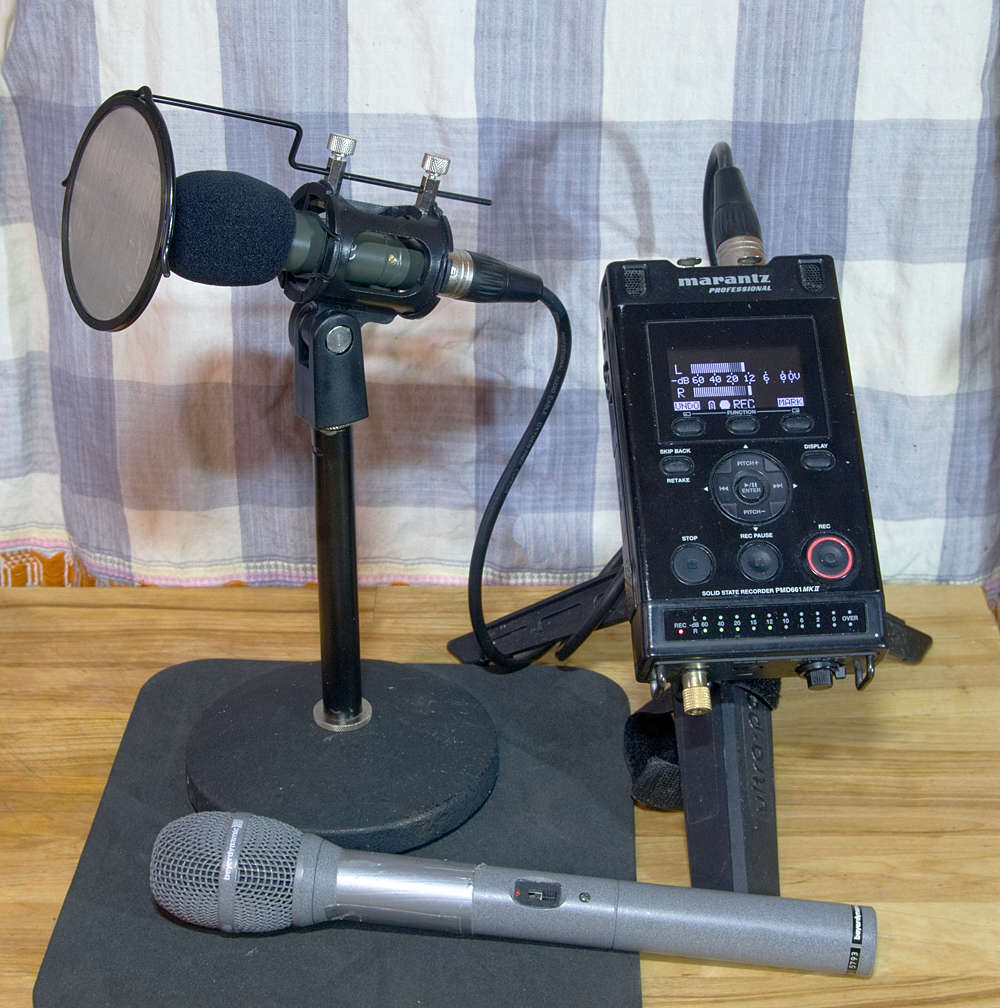
Many digital audio recorders costing a few hundred pounds, like the Marantz PMD-661 shown on the right, can be fed audio signals from a variety of sources. Here it is set up to record from a small sensitive directional microphone, getting its power from the recorder through the thick shielded XLR cable. The microphone is held between rubber bands in a shockmount housing atop a desk-top mic stand, so that knocks against the table won’t travel up into the body of the mic (sitting the whole thing on a mouse-mat also helps!) The mic is further protected against the speaker’s breath by a foam cap and metal mesh ‘pop screen’.
The microphone at the bottom of the picture is designed for rougher handling and a different kind of recording context: its recording capsule, powered by an internal battery, is cradled in an internal shockmount. This microphone is omnidirectional, and has an extra long handle to reach out to an interviewee in the street.

Conrad Taylor is an independent writer, teacher and media worker.
Archive

Standard

This portion of the site contains archived versions of the many guides to good practice published by w4mp. None of the material here should be regarded as current or relied upon: it is here as a resource for historians and researchers.

The full collection of archived material can be found on http://archive.w4mp.org/ for reference purposes.

Bullying and Harassment and Sexual Harassment support services

Standard

Independent Complaints and Grievance Scheme (ICGS) Helpline: supporting those affected by bullying, harassment and sexual misconduct

Call: 0808 168 9281 (freephone)

Email: Support@ICGShelpline.org.uk

The Helpline is open 9am to 6pm, Monday to Friday

If you feel you have experienced, witnessed, been accused of or are supporting someone  with bullying, harassment or sexual misconduct, the Independent Complaints and Grievance Scheme (ICGS) Helpline can provide you with emotional support and guidance on the options available to you and the processes involved.

The ICGS Helpline is confidential and independent of Parliament. The service is delivered Victim Support, an independent charity who provide specialist support services to those affected by crime and traumatic events.

The Helpline is available to current and former members of the Parliamentary community, whether your experience happened on the Parliamentary Estate, in a constituency office, or while undertaking parliamentary work elsewhere. It is also available to visitors to the Parliamentary Estate in Westminster.

In addition to the support provided by the helpline, direct access is available to an Independent Sexual Misconduct Advisor (ISMA), who can provide immediate and ongoing support through all elements of your enquiry or complaint and help you decide what you would like to do. #

For further information on the options available to you through the ICGS Helpline please visit the ICGS web pages

HoC Library Talks on YouTube

Standard
Please note that links to the old Parliamentary intranet have been removed as of October 2023. Please use search on ParliNet to find relevant current details, if available. https://parlinet.parliament.uk/house-of-commons-members-staff/ Did you know that the House of Commons Library Talks are nowavailable in audio format on the UK Parliament YouTube Channel? You can access the list of past talks on the intranet here: http://bit.ly/2kzM1iY and if you click on the link to a particular talk, it will give you a directly link to the YouTube audio for that talk.

Library Briefing Paper on Brexit now available

Standard

The House of Commons Library has published an important paper that looks at the current situation in a range of policy areas and considers what impact Brexit might have.

This will depend, among other things, on the Brexit negotiations, whether the UK stays in the European Economic Area and how the Government fills any policy gaps left by withdrawal.

Read the summary

Download the full report (PDF)

Managing an Internship in Your Office

Standard

For information on short-term work experience placements for school pupils or college students, please see our page on ‘Organising Work Experience in an MP’s Office

The Chartered Institute of Personnel and Development (CIPD) has developed a Charter, which offers a Code of Practice on good management practice in order to make an internship as successful as possible.   W4MP supports this code of practice recommends it to all those involved in offering and taking part in internships.

If you are looking at this page because you are considering submitting an advertisement for an internship on W4MP, you may wish to revise the wording of your proposed advertisement to reflect this advice, before proceeding to submit it.

The CIPD is the UK’s leading professional body involved in the management and development of people.  Even though organisations benefit from internships, their prime purpose is to provide interns with meaningful work experience that enhances their employability and skills.  Ideally, an Intern should be paid a salary reflecting the contribution they make to the organisation, and at least receive the National Minimum Wage (or London Living Wage, where applicable).  However, the quality of the experience for the Intern is the most important factor.

The CIPD recommends that organisations offering internships should adhere to a voluntary code of practice, which is laid out in the following sections, indicated by the text in bold and italics.


Introduction

Congratulations, you got a job – you are now a Parliamentary Researcher (or some other equally-misleading job title), probably responsible for everything from making tea and opening post to writing speeches and shaping policy.  Brilliant!  I hope you’re feeling suitably pleased with yourself.  And, what’s more, you now appear to be diligently reading the guides on w4mp to make sure you’re as good as you can be at your job.  What a star!  (Either that or you were reading the funny cartoon strips and stumbled across this by accident…)

So, you arrive on your first day, open the post, change the voicemail recording (after a few attempts) to you enthusiastically suggesting people call the constituency office, and your MP has been packed off to the first of a series of meetings.  You’re about to tackle your inbox, starting to feel like you might actually know what you’re doing, when there’s a coughing noise in the corner of the room.  There in the corner, nervously trying to check Facebook with their screen turned so that they think you can’t see it, is an Intern.

Argh! As if managing yourself and your MP isn’t quite enough, there’s someone else.  Someone that relies entirely upon you to tell them what to do, and how to do it.

However, judging by the amount of applications that come in for parliamentary internships, chances are this person is pretty good.  Internships should be, and can easily be, mutually beneficial.  They want to learn about the job, get some experience and enjoy being in Westminster.  You’d like some help around the office, and someone to rant with when your boss is running two hours late or you spill your paper cup of porridge from the Debate caff all over your keyboard.  (Believe me, that stuff is like glue.)

Firstly, take a minute to consider whether you’re actually able to take an Intern on.  Do you have enough desk space?  Do you have a computer available for them to use?  Is there enough interesting work for them to do?   Can you commit to being able to have them in the office for a reasonable length of time?  Do you have the funds to pay them?

If the answer to all of these questions is yes, then you’ll need to talk to your MP about how it’s going to work.  Once they’ve agreed that your idea was brilliant, and you should definitely get an Intern, then it’s time to talk about all the technical stuff like pay.

It is always a good idea to talk to other MPs’ staff too, to hear about their experiences and handy hints.

Important: Do you have a computer which people on work experience or internships can use?

Be aware, that if your office has only computers supplied by PDS (formerly PICT), whether they be loaned or purchased, there is no longer a facility for a ‘guest, ‘local’ or ‘admin’ login, so people who do not have both security clearance and a network account will not be able to access those computers at all.  As most of the work in an MP’s office involves using a computer, this restriction will affect the type of task you are able to give to the student/volunteer/Intern, and may be a deciding factor in whether or not you can offer a work experience placement at all, particularly if it is just for one or two weeks.  For students on a longer work placement, e.g. a few months, you can apply for security clearance and a network account through the normal channels; they do not need to be formally employed to apply for these.

For information about security clearance for people on work experience check ParliNet.

Recruitment

“Interns should be recruited in broadly the same way as regular employees of an organisation, with proper consideration given to how their skills and qualifications fit with the tasks they will be expected to fulfil.  Recruitment should be conducted in an open and rigorous way to enable fair and equal access to available internships.  The job advertisement should give a clear indication of how long the internship will last, and at interview, the Intern should be told honestly whether there is a real chance of obtaining a full-time contract.”


Now you need to advertise and, as chance might have it, you’re in the right place.  Take a look at some of the existing adverts on W4MP, and it shouldn’t be too hard to write something along similar lines.  Just make sure you are really clear about the important things like where the internship is based, and what expenses are covered.

It’s important to advertise nationally, and as widely as possible.  As well as W4MP, you might want to look at third sector jobs boards or advertise locally in your constituency.

Assuming you’ve got your morally, ethically and legally sound advert up, the applications should come flooding in and you can enjoy the power-trip of picking over people’s CVs and pretending to be Alan Sugar.

One word of caution though – to save your applicants sweating over the refresh button of their inbox, try to acknowledge receipt of all applications and let them know roughly when they’ll hear back from you.  There’s really no excuse for just never getting back to applicants; if they didn’t get it, they’d rather just know.

Induction

“Interns should receive a proper induction to the organisation they enter to allow them to fully integrate.  Whether joining a large organisation, or an SME, an Intern just entering the job market may find the workplace intimidating.  It is important to introduce an Intern to the staff and the values of the organisation to help them integrate into the team, and allow them to hit the ground running.”

Make sure your shiny new Intern is clear about the kinds of things they might be doing, the hours you’d like them to work (although, again, this must be flexible if you aren’t paying) and the expenses/pay they’ll get.

It might be useful to have a short guide to post out to them before they start explaining a bit about how the office runs, what they might be doing, and a quick introduction to life in Parliament and your constituency.  It sounds like a lot of work, but it will save you time in the long run when you realise on week three that they’ve been telling everyone on the phone that your constituency is Barnsley, not Burnley, or when they run out of the building screaming the first time the division bell rings.

If you have a current Intern, this can be an interesting task for them to do; to write a guide of everything they wished they knew before starting!

Most importantly, get their pass application in ASAP! The sooner it’s in the better, and usually the applications are processed in 5 working days.  You are not allowed to bring them in as visitors and escort them around if they are coming to work, and it is a serious breach of security to do so.  No matter what you’ve read in their CV or whether you know them personally, without the full background and Counter Terrorism Check you could be unwittingly letting someone with nefarious intentions into Parliament.

Supervision

“Organisations should ensure there is a dedicated person(s) who has ring-fenced time in their work schedule to supervise the Intern and conduct regular performance reviews.  This person should provide ongoing feedback to the Intern, be their advocate and mentor during the period of internship, and conduct a formal performance review to evaluate the success of their time with the organisation.”

If you can arrange their first day to be one when your MP isn’t in, that makes things a lot easier.  Then you can show them around when your workload is a little lighter, and they can feel a little bit more like they know what they’re doing before the big boss is watching.

Things to do on the first day:

Tour.  Try to book them on an official tour.  Your ‘fact’ about Michael Jackson trying to buy the throne in the House of Lords might be funny, but probably not that much use when they suddenly have to show your MP’s nephew around the palace and all the tours are fully booked.  See our guide on Tours here: https://w4mp.org/w4mp/w4mp-guides/guides-to-parliament/tours-of-the-houses-of-parliament/

Show them around the building.  It sounds silly, but if you don’t tell them where the loo is, you might find you have a very shy Intern in inexplicable agony.  Make sure they know where they can get food, where the kitchen is, the Post Office, Vote Office, cash points, Travel Office, Whips’ Office, Members’ Centre, and anywhere else you go on a regular basis, including the Sports and Social Club.

Introduce them to people.  Make sure your Intern gets to meet lots of other new Interns.  Perhaps you can arrange to go for lunch with a few other researchers and their interns, or go to the Sports and Social Club for their first taste of parliamentary gin.

It’s also a good idea to introduce them to someone outside of the office that your Intern can talk to if they have a problem.  There should always be someone other than you and your MP that they can talk to should they be unhappy with any aspect of their internship.

This would also seem a logical point to let your Intern know about their right to union representation.  Unite has an active Parliamentary Staff Branch which represents staff both in Westminster and in the constituencies.

Give them some work to do.  The best way to learn is generally by doing, so there’s no reason why they can’t get to work fairly quickly.  Just make sure that you’re always there to answer lots of questions for them, and be patient.

Members Staff Register.  All Interns who are issued with a pass valid for more than three months are obliged to sign the Register Of Interests Of Members’ Secretaries And Research Assistants.  Remind them that if they receive a bursary or any other financial or material benefit, they may need to record it in the Members’ Staff Register, subject to the relevant thresholds.  The Member would also need to record any bursary in the Register of Members’ Financial Interests.  The staff of the Parliamentary Commissioner for Standards are very approachable and helpful, so don’t hesitate to give them a call if you’re not sure of anything.

So you made it through the first day without them thinking that you’re entirely incompetent and trying to perform a coup in the office.  Congratulations.

From herein it’s really not that hard.  Just talk to your Intern a LOT.  Make sure you always know what work they’re doing, how it’s going and if it’s too hard or too easy.  The worst thing would be to get to the end of the first week and find that they misunderstood something right at the start and all their work needs re-doing.

Treatment

“During their time with an organisation interns should be treated with exactly the same degree of professionalism and duty of care as regular employees.  They should not be seen as ‘visitors’ to the organisation, or automatically assigned routine tasks that do not make use of their skills.  Organisations should make some allowance for interns to, on occasion, attend job interviews or complete study requirements.”

Having an Intern can be brilliant.  To make sure that you get the most out of it, talk to them before they arrive about what they’re particularly good at and what they enjoy.  Maybe they love web design and would be great at starting up your website.  Or perhaps they love working with kids and would be brilliant at giving some school tours.  Whatever it is, find that talent, and make the most of it.  That way you’ll get something valuable, and they will enjoy their experience a whole lot more.

As well as the obvious pleasure your Intern will have in working with you, Parliament itself is a pretty great place to work, and you should make sure your Intern has time to enjoy it.  Here’s my quick checklist for things they should be able to do while they’re here:

  • Go on a parliamentary tour.
  • Sit in PMQs.
  • Sit in the Gallery for other interesting debates.
  • Sit in the House of Lords Gallery.
  • Write and table an EDM.
  • Write and table a Parliamentary Question.
  • Sit in a Select Committee meeting.
  • Accompany your MP over to Millbank studios.
  • Sit on the terrace and feel a bit smug as the tour boats go past.
  • Go along to a few receptions with free wine/canapés.

These are only a few suggestions.  Some might not be possible in your office, but you get the picture.  It helps to have a physical checklist of things your Intern wants to do before they leave, to make sure that you don’t reach the last week and have to try to cram everything in all at once.

Payment and Duration

“As a bare minimum the organisation should cover any necessary work-related expenses incurred by the Intern.  This includes travel to and from work, and any travel costs incurred whilst attending external meetings/events.  If an internship is unpaid and provides only expenses, then the internship should be no longer than four months.”

It is essential at this point to do the serious bit, and consult National Minimum Wage legislation.  This legislation exists to protect people from working for insufficient wages or for free.  It’s really important, not only from a moral point of view, but also because if you break it you, or your MP, could end up in court.  However, don’t worry; it’s pretty easy to understand.  If the opportunity you’re advertising fits the criteria, you must pay at least minimum wage.  If not, you don’t.  Simple.  Have a look at these:

You also need to make sure you remember what you’re advertising for!  An Intern is not a member of staff, not a skivvy, not a diary manager or professional tea-maker.  An unpaid internship must, by law, not have set hours or roles.  So if you’re not going to pay them, your Intern needs to know that they can come and go at different hours to you should they need to, and you can’t rely on them to run the office.  You may reimburse reasonable basic travel and subsistence expenditure for your registered volunteers.  You should ask your Intern to keep all of the receipts for lunch and travel, so that you can submit them to IPSA.  This expenditure will come out of your Staffing Allowance.

The Independent Parliamentary Standards Authority (IPSA) is responsible for payment of business costs to MPs and their staff.  Look at its website to learn more about what it does.

If you’re paying your Intern, you’ll need to provide them with a proper contract of employment.  If you’re not able to pay your Intern, it’s still important to make sure they know what to expect from the internship, and what you can get in return.  See the info below about IPSA and their IPSA Model Volunteer Agreement.

It is important that you read their guidance .  There is a distinction between ‘Employed Interns’ and ‘Volunteers’ and, if you are paying your Intern less than National Minimum Wage, you should read their Model Volunteer Agreement.  You might also find it helpful to put ‘Intern’ into the search facility on the IPSA website; there are a number of other useful references.

Certification/Reference and Feedback

On completion of their internship organisations should provide interns with a certificate/reference letter detailing the work they have undertaken, the skills and experience acquired, and the content of the formal performance review conducted at the end of the internship.  Interns should also be offered the opportunity to give feedback on their experience in an ‘exit interview’, giving organisations the opportunity to reflect on its own performance in delivering internships.

So, your Intern is leaving.  By now, you’re probably inseparable, and you’re sure you saw the shine of a tear in your MP’s eye as they set off for the constituency after saying that last goodbye.  Or perhaps it’s all been a bit more professional and stiff-upper-lip than that.  But however it went, it’s important to end an internship with as much thought as it began.  Your Intern needs a proper evaluation of how the internship went, either through a meeting with you or with your MP, so that they can come away with some positive feedback and areas for development.  You might also be able to help them if they’re job-hunting in Parliament, or by providing references.

So by now you are an expert manager, your CV is gold-plated, and you just made an Intern pretty happy.  You probably have just enough time to give yourself a quick pat on the back before starting to sift through that next pile of CVs…

From the Chartered Institute of Personnel and Development (CIPD) ‘Internships that work – a guide for employers‘: http://www.cipd.co.uk/hr-resources/guides/internships-employers-guide.aspxFor information on short-term work experience placements for school pupils or college students, please see our page on ‘Organising Work Experience in an MP’s Office


Complaints about an MP

Standard

w4mp is not able to investigate complaints about MPs or the House of Commons. Please do not send complaints or personal information to w4mp, as we will not be able to assist.

There are two organisations which deal with complaints about Members of Parliament:

You may wish to contact the House of Commons Enquiry Service for further advice on how to make a complaint.

Parliamentary Commissioner for Standards

The Parliamentary Commissioner for Standards will investigate allegations that an MP has broken the Code of Conduct and the rules associated with it. These include for example rules about: „

The Commissioner will not investigate complaints about:

  • policy matters;
  • an MP’s views or opinions;
  • an MP’s handling of or decision about constituency cases and correspondence at any stage; (A local MP will generally do as much as they can to help a constituent, but (s)he is not obliged to take up every matter that is brought to their attention);
  • the conduct of an MP’s wider public life, unless the MP’s conduct has caused serious damage to the reputation of the House of Commons as a whole or of MPs more generally.

Further information can be found here: https://www.parliament.uk/mps-lords-and-offices/standards-and-financial-interests/parliamentary-commissioner-for-standards/complaints-and-investigations/

Compliance Officer for the Independent Parliamentary Standards Authority

http://www.parliamentarycompliance.org.uk/

The post of Compliance Officer for IPSA was established by the Parliamentary Standards Act 2009, as amended by the Constitutional Reform and Governance Act 2010.

The Compliance Officer’s remit is defined in statute and is to:

  • conduct an investigation if he has reason to believe that an MP may have been paid an amount under the MPs’ Scheme of Business Costs (the Scheme) that should not have been allowed; and
  • at the request of an MP, review a determination by IPSA to refuse reimbursement for an expense claim, in whole or in part.

As the Compliance Officer’s role is confined to matters pertaining to the Scheme, he has no power to investigate complaints that pre-date the creation of IPSA in May 2010.  Complaints regarding expense claims prior to May 2010 are usually handled by the Parliamentary Commissioner for Standards.